 MusicFinder
How to find the exact song on Instagram with an ISRC code

You search for a song in Instagram's music picker and get a wall of covers, sped-up edits and tracks with the same name. The recording you actually want is somewhere in there, or it is not showing at all. An ISRC search cuts through that.
The short version
- Find the song's ISRC code. In MusicFinder, type the song name and tap the code next to the right recording. It is copied as
isrc:CODE. - In Instagram, start a story or reel and open the music picker.
- Paste into the music search box. It should look like
isrc:USUG11904206, with no spaces. - If that recording is in the music library for your account and country, it is the result you get.
Why title search lets you down
A song title is not unique. Thousands of recordings are called "Stay" or "Home". Popular songs also attract covers, karaoke versions and re-uploads that are named to look like the original. A text search has to guess which one you mean, and it often puts the wrong one first.
An ISRC is different. It is a 12-character code given to one specific recording. The album version, the radio edit and the live version of the same song each carry their own code. Search by ISRC and there is nothing left to guess. If you are new to these codes, start with what an ISRC code is.
Step by step
1. Get the code
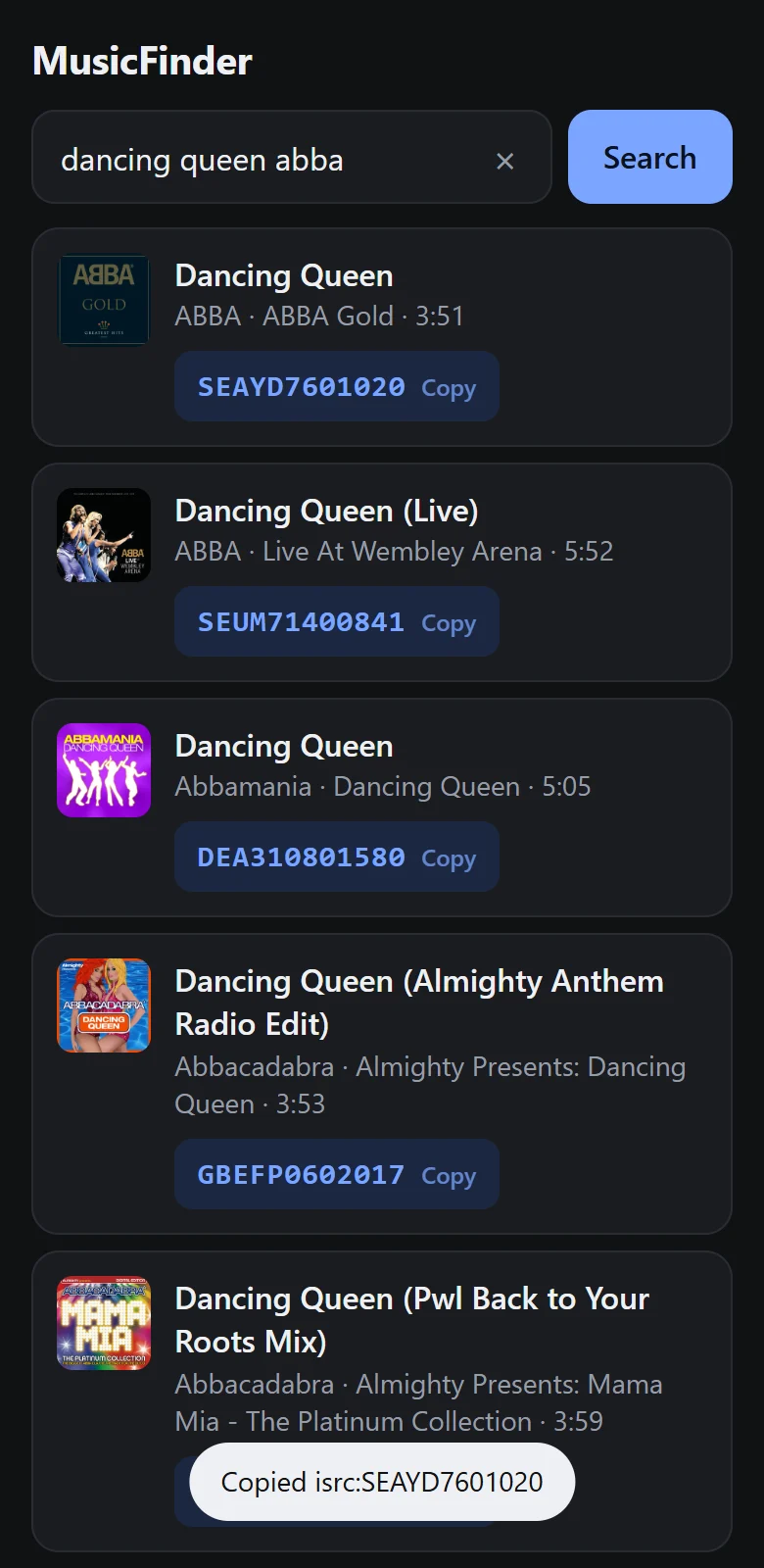
Open MusicFinder and type the song name. Adding the artist narrows the list. Each result shows the title, artist, album and length, so you can tell the original from a live take or a remix. Tap the code and it is on your clipboard with the isrc: prefix already in front.
2. Open the music picker
In the Instagram app, create a story and add the Music sticker, or create a reel and tap Audio. This works in the mobile app. The music picker is not available in a desktop browser.
3. Paste and search
Paste the text into the search box. Keep it as one piece: isrc: followed straight by the code, with no space and no dashes.
If nothing comes up
An ISRC search is a more exact way to look. It is not a way to add music that Instagram does not offer you. If the search returns nothing, the usual reasons are:
- The recording is not licensed for your country. Music rights are sold country by country.
- Your account type has a smaller library. See why business accounts see less music.
- The release has not reached Instagram yet, or the artist's distributor never sent it.
- You picked a different version. Go back to MusicFinder and try the code of another version of the song.
Our guide to why a song is not available on Instagram covers each of these and what you can reasonably do about it.
Is this an official feature?
We could not find it in Instagram's own help pages. It is described in the help centres of several music distributors, who tell artists to use it when fans cannot find a release by name. Because it is not documented by Instagram, it may change or stop working without notice. If it does, searching the exact title and artist together is the fallback.
Tips for getting the right recording
- Compare the track length. A 3:20 album version and a 2:45 radio edit are different recordings with different codes.
- Check the album name. A song often appears on the original album, a deluxe edition and a greatest-hits collection. These usually share one ISRC, but a remaster gets a new one.
- For your own music, use the ISRC your distributor gave you. That is the one that was delivered to the platforms.
Find the ISRC in seconds
MusicFinder is a free Android app: type a song name, tap the code to copy it.
Keep reading

Why a song is not available on Instagram, and what you can do
The real reasons a song is missing or blocked in Instagram's music library, from country licensing to account type, and the fixes that stay within the rules.
3 min read
What is an ISRC code? A plain guide
An ISRC is the 12-character code that identifies one recording of a song. What the parts mean, who assigns it, and where to find one.
2 min read
Why business accounts see less music on Instagram
Chart songs missing from your Instagram music picker? Business accounts get a smaller, royalty-free library. Why that is, and your options within the rules.
2 min read